

Post to Slack
Hear in a Slack channel when a user needs your team, reports a problem, or a saved test starts failing.
Last updated
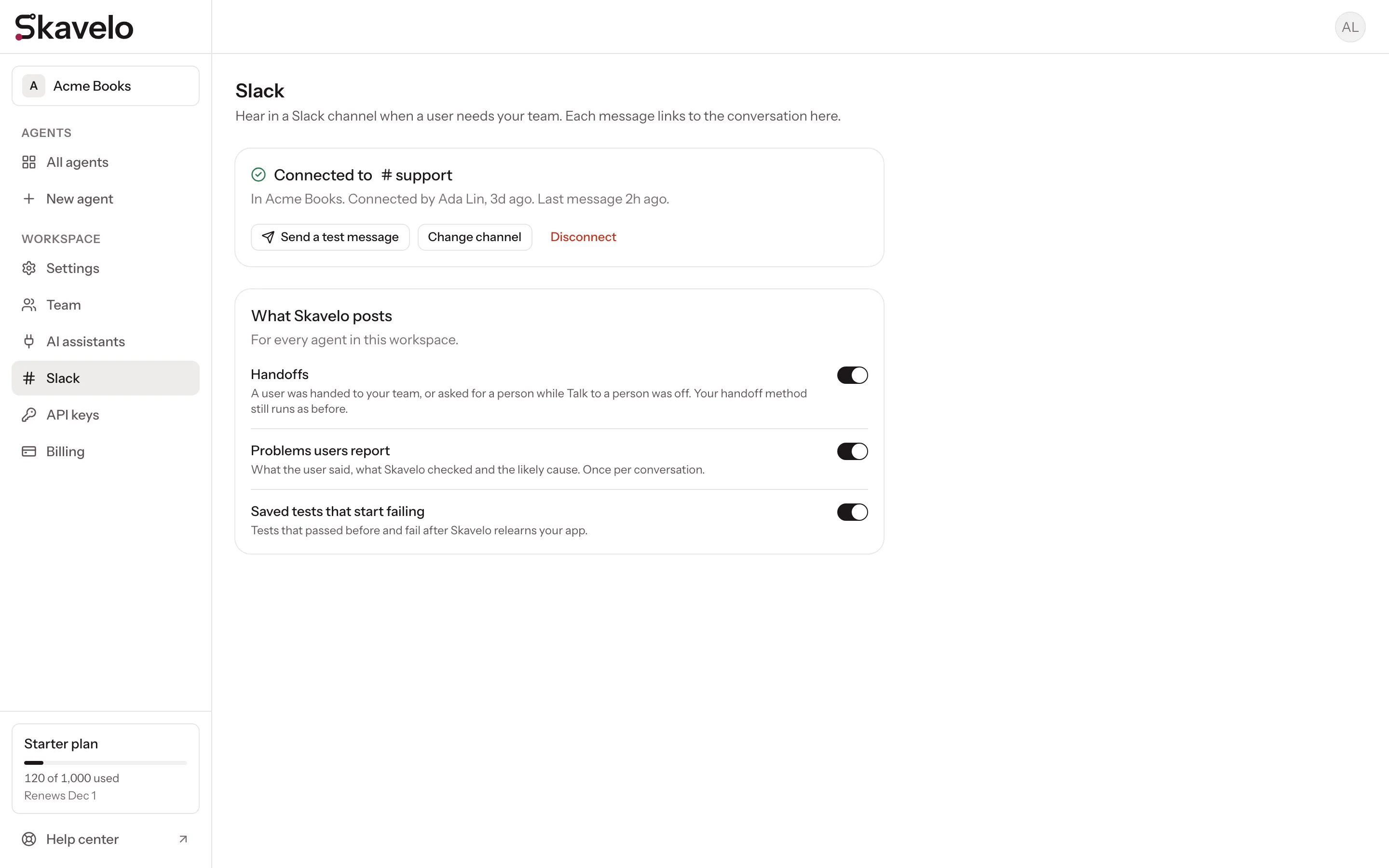
Connect Slack and Skavelo posts to a channel you choose when a user needs your team. Each post shows who the user is and what they asked, with a button that opens the conversation in your dashboard.
One connection covers every agent in your Skavelo workspace. Workspace owners and admins can connect it.
Connect Slack
- In the dashboard, go to Settings, then Slack.
- Click Add to Slack. Sign in to your Slack workspace if Slack asks.
- Pick the channel to post in, such as #support, and click Allow.
You're taken back to the dashboard, and Skavelo posts a hello in the channel. To check it any time, click Send a test message.
If Slack says the app isn't approved
Slack may say the app isn't approved by Slack yet. You can still click Allow. If your Slack only allows approved apps, Slack asks one of your Slack admins to approve Skavelo first.
To post in a private channel, pick it from the same list. Slack only lists channels you're a member of.
What Skavelo posts
Under What Skavelo posts, switch each kind of post on or off. All three are on when you connect.
| Post | When |
|---|---|
| Handoffs | A user is handed to your team, or asks for a person when Talk to a person is off. Your handoff method, such as your support chat or email, still runs as before. |
| Problems users report | A user reports a problem. The post has what they said, what Skavelo checked and the likely cause. Once per conversation. |
| Saved tests that start failing | A saved test that passed before fails after Skavelo relearns your app. |
When a user asks for a person and Skavelo couldn't offer one, the post says why: Talk to a person is off, or the page had no support chat and no fallback email. Its button opens the agent's handoff settings, so you can fix it. These conversations also appear in Needs attention.
Change the channel or disconnect
- Change channel takes you through Slack again to pick another channel. Skavelo then posts only there.
- Disconnect stops all posts and removes Skavelo from your Slack workspace. Handoffs still reach your team the way you set them up for each agent.
When posts stop
If Slack refuses a post, the Slack page in the dashboard says why and since when. Usually the channel was archived, or the Skavelo app was removed from Slack. Click Change channel to connect again and pick a channel.
What Skavelo can see in your Slack
Skavelo asks Slack for one permission: to post in the channel you pick. It can't read messages, see other channels or list the people in your Slack.
The posts include what the user asked and the name and email you send Skavelo about them, so pick a channel only your team can see. The address and token Slack gives Skavelo are encrypted, and deleted when you disconnect. See the privacy policy for details.
Questions? Email hello@skavelo.com.
Hand conversations to your team
Let users reach a person when Skavelo can't help, through your support chat, by email or with your own code.
Weekly summary
A Monday email with what Skavelo got done and what to fix next: questions it couldn't answer, tasks it could only describe, and screens without a saved walkthrough.